 Jessica

A daughter installs six gadgets in her father’s home. A week later, he has unplugged four of them because they beep, and the remaining two confuse him. The tech was impressive, but it solved problems he did not have. Independence at home depends on small daily things: seeing the floor at night, remembering the stove, getting help quickly, and not feeling watched. So which smart home devices help older adults live independently? The best ones match a real risk, work without effort, and respect privacy. This guide shows you how to choose. You will find a quick answer, a device table, a risk-to-device table, a dignity test, a four-step setup plan, and a short FAQ. Start with the person’s habits, not the product catalog.
Which Smart Home Devices Help Older Adults Live Independently?
The most useful devices are motion-activated lighting, voice assistants, smart smoke and carbon monoxide alarms, medical alert or fall detection devices, video doorbells, smart locks, medication reminders, and stove or water safety sensors. Choose them based on specific risks, and keep setup simple.
Why Start With Lighting?
Falls are the leading cause of injury for adults 65 and older, and one in four older adults reports falling every year. Older adults can need up to three times more light to see well, and their eyes adjust more slowly to changes in light. Motion-sensor lights along the bedroom, hallway, and bathroom route are a low-effort way to reduce risk. Fall detection devices can bring help quickly, but they cannot prevent a fall. Prevention and response work as a pair.
Which Devices Help With Which Need?
| Device | Helps With | Caution |
|---|---|---|
| Motion-activated lights | Night walking, stairs, bathrooms | Place sensors at the right height and range |
| Voice assistant | Calls, reminders, lights, music | Needs clear speech and some practice |
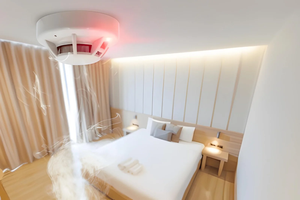
| Smart smoke and CO alarms | Early warning, family alerts | Test monthly and replace on schedule |
| Medical alert or fall detection | Rapid help after a fall | Must be worn or placed correctly, and tested |
| Video doorbell | Seeing visitors, preventing scams | Check privacy and recording rules |
| Smart lock or keypad | Lost keys, caregiver access | Keep a backup entry method |
| Medication reminder or dispenser | Missed or doubled doses | Confirm with a pharmacist or doctor |
| Stove shutoff or sensor | Forgotten cooking | Ask an installer about compatible stoves |
| Water leak sensor | Overflow, burst pipes | Place near sinks, washers, and heaters |
| Smart thermostat | Comfortable heat, remote adjustment | Keep a simple manual control |
How Do You Match Risk to Device?
| Daily Risk | First Device to Try |
|---|---|
| Night trips to the bathroom | Motion-sensor lights |
| Forgetting appliances | Stove sensor or timer, voice reminders |
| Missing medication | Reminder or dispenser |
| Being alone after a fall | Fall detection or medical alert |
| Visitors and scams | Video doorbell, smart lock |
| Loneliness | Voice assistant or video call device |
| Hot or cold rooms | Smart thermostat |
What Is the Dignity Test?
Before you buy anything, ask four questions.
- Will they use it without help? If it needs daily troubleshooting, it will be dropped.
- Do they want it? Consent matters. A device used under protest is soon unplugged.
- Does it respect privacy? Avoid cameras in bedrooms and bathrooms. Explain who can see data and alerts.
- Does it still work if the internet fails? Choose devices with a local backup, such as a loud local alarm or a physical switch.
How Do You Set It Up?
- Talk first. Ask what worries them, and what they would be comfortable with.
- Start with one or two devices from the risk table. Use it for a few weeks.
- Write simple instructions in large print, and keep the support number on the device.
- Add backup contacts and test alerts with a family member or neighbor.
- Review monthly. Remove anything unused, and adjust placements.
Frequently Asked Questions
Do older adults need a smart speaker?
Not always. It helps people comfortable with voice commands, but it adds little if it is ignored.
Are cameras a good idea?
Cameras at the front door can help. Indoor cameras need the person’s clear agreement and careful placement.
Who can help me choose?
An occupational therapist or a local aging services office can recommend devices based on real needs.
Bottom Line
The best smart home setup is the quiet one. Start with lighting and one safety alert, match each device to a real risk, and apply the dignity test. Technology should support independence, not replace it.
Must visit https://designmode24.co/ for smart home devices ideas.