 Jessica
The router goes down, and the “smart” house suddenly gets very dumb. The lights ignore your phone, the lock app spins, and the voice assistant apologizes. It is a good reminder that many smart devices are only as reliable as one box in the hallway. So which smart home devices work without Wi-Fi?
More than most people think, but the answer needs care. Some devices use other wireless standards, some work locally through a hub, and some keep basic functions when the internet drops. Almost none give you app control from outside the house without a connection somewhere. This article sorts devices by how they connect, so you can plan a setup that survives an outage. You will find a quick answer, a connection table, a device guide, an outage test, and the mistakes that catch buyers out. It suits renters, homeowners, and anyone with patchy broadband. Read the quick answer first, then use the sections that fit your home.
Which Smart Home Devices Work Without Wi-Fi?
Smart home devices that work without Wi-Fi include those using Zigbee, Z-Wave, Thread, or Bluetooth, plus cellular security systems and simple radio-controlled switches. Many still need a hub or border router with power, and remote access usually needs the internet. Local control, such as schedules and automations, can keep running during an outage.
How Wi-Fi-Free Devices Connect
| Connection | Needs | Range | Offline control |
|---|---|---|---|
| Zigbee | Hub | Mesh, device to device | Yes, if the hub processes locally |
| Z-Wave | Hub | Mesh, device to device | Yes, if the hub processes locally |
| Thread (with Matter) | Border router | Mesh | Often yes, depends on the controller |
| Bluetooth | Phone nearby | About 30 feet, less through walls | Yes, when you are close |
| Cellular | SIM in the device or hub | Anywhere with signal | Alerts work, with a plan |
| Radio or infrared remotes | Handheld remote | Same room or house | Yes, no network at all |
Device Guide
| Device | Wi-Fi-free option | Limit |
|---|---|---|
| Light bulbs | Zigbee or Bluetooth bulbs | Hub or phone needed |
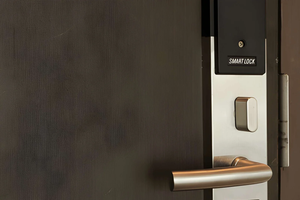
| Door locks | Keypad or Bluetooth locks, Z-Wave locks | Remote unlock needs internet |
| Sensors | Zigbee or Z-Wave motion and door sensors | Need a hub to act on events |
| Plugs and switches | Zigbee, Z-Wave, or radio-controlled | Check compatibility |
| Alarms | Cellular-backed systems | Monthly plan often required |
| Thermostats | Many keep schedules offline | App control needs a connection |
Battery-powered sensors and locks are a good place to start, since they keep working through a power cut for a while.
Test Your Setup for an Outage
- Turn off your router for ten minutes while someone is home.
- Try each device by wall switch, button, and app.
- Note what fails. Cloud-only devices usually go first.
- Check the hub. Confirm whether it needs the internet to run automations.
- Keep manual backups, such as physical keys and wall switches.
Mistakes to Avoid
The most common mistake is assuming “no Wi-Fi” means “no internet.” A Zigbee bulb talks to a hub, and many hubs rely on the cloud for setup or remote access. Another is trusting Bluetooth for whole-home control, since range is short. Buying proprietary systems that lock you to one app also limits choices. Finally, don’t remove manual overrides. A lock with no key option is a risk in a power or battery failure.
FAQ
Can a smart home run with no internet at all?
Yes, if you use local-processing hubs and local protocols. You lose remote and voice-cloud features.
Do smart speakers work without Wi-Fi?
Most need a connection for voice recognition, so they are poor offline.
Is Matter Wi-Fi-free?
Not always. Matter runs over Wi-Fi, Thread, or Ethernet, so check which your device uses.
Bottom Line
Smart home devices work without Wi-Fi when they use Zigbee, Z-Wave, Thread, Bluetooth, or cellular links with local control. Choose local hubs, keep manual backups, and test with your router off. Expect to lose remote access, not basic automation.
Must visit https://designmode24.co/designmode24-interior-design/ for smart home devices.